
I’m fairly certain there’s a special corner of hell reserved for WordPress plugin developers who built their careers on upselling half-baked “freemium” tools. That said, I’ve never been a fan of the word no—and I like paying for things even less.
Which is exactly why it pays to know how to tear things apart and rebuild them. Channel that development rage into something useful—focused, critical problem-solving. Case in point: WooCommerce, the best worst option for running eCommerce on WordPress.
This post is mostly a note to my future self so I don’t have to rediscover this nonsense later.
Today’s lesson:
WooCommerce, unsurprisingly, does not provide a shortcode or block for outputting just the product name in email templates. Instead, you get “Order Details,” which—shocking—dumps the full order: pricing, totals, and a clunky table layout. That’s fine until you’re not actually selling anything and are using Woo as a free event registration system, where all you really need is the product name and quantity output in the customer email receipt.
I usually rely on YayMail to customize WooCommerce emails. Another freemium plugin I refuse to pay for. But like WooCommerce itself, it’s still constrained by whatever limited output Woo allows. A quick search turns up the same answer everywhere: you can’t do it cleanly—just hack it together by hiding unwanted table elements with CSS.
Perfect.
Fortunately, WooCommerce spits out some truly awful HTML. So I responded in kind—layering in my own equally questionable HTML and CSS. If there’s one constant in development, it’s this: I will bend things to my will, one way or another.
Let’s turn the left image into the right image.
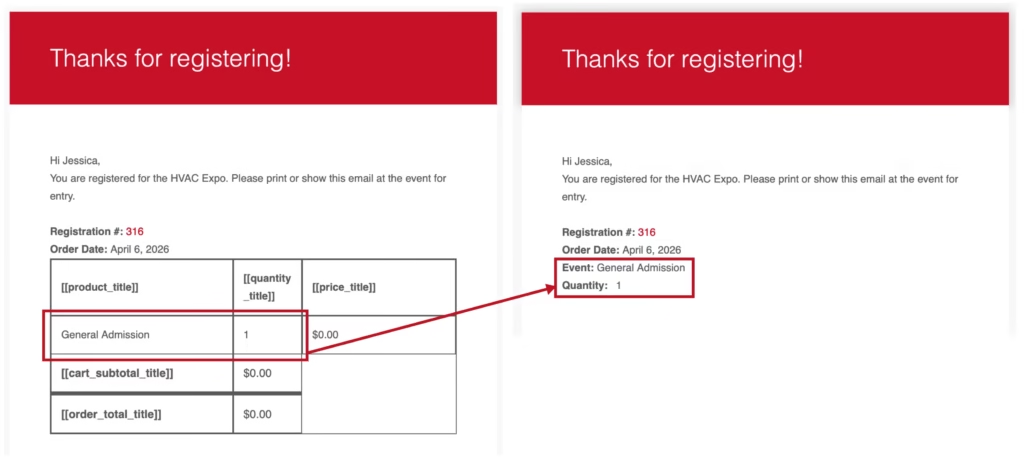
Click the gear icon at the top LEFT of the specific email you are editing in YayMail to access the global settings. Enable custom CSS and add this nonsense.
.yaymail-product-name::before {
  content: 'Event: ';
  font-weight: 600;
}

.yaymail_item_quantity_content::before {
  content: 'Quantity: ';
  font-weight: 600;
  padding-right: 10px;
}

.yaymail_item_quantity_content {
  border-width: 0px !important;
  padding: 0px !important;
  width: 100% !important;
  display: flex;
}

.yaymail_item_product_content {
  border-width: 0px !important;
  padding: 0px !important;
  width: 100% !important;
  display: flex;
}

.yaymail-order-details-table {
  border-width: 0px !important;
}

.yaymail_item_product_title {
  display: none;
}

.yaymail_item_quantity_title {
  display: none;
}

.yaymail_item_price_title {
  display: none;
}

.yaymail-product-sku {
  display: none;
}

.yaymail-order-detail-row-cart_subtotal {
  display: none;
}

.yaymail-order-detail-row-shipping {
  display: none;
}

.yaymail-order-detail-row-payment_method {
  display: none;
}

.yaymail-order-detail-row-order_total {
  display: none;
}

.yaymail_item_price_content {
  display: none;
}
Add a custom text area to the email template and delete everything. From the menu open code view and insert something like this.
<div>Hi [yaymail_billing_first_name],<br />
You are registered for the whatever Expo. Please print or show this email at the event for entry.<br />
<br />
<strong>Registration #:</strong> [yaymail_order_number]<br />
<strong>Registered Attendees:</strong> [yaymail_order_product_line_item_count]<br />
<strong>Order Date:</strong> [yaymail_order_date]<br />
[yaymail_order_details]<br /><br />
</div>
